Intelligence is a reporting tool connected to Concur. Any business liaison identified in Concur as the primary department business liaison approver has direct access to Intelligence from their Concur profile. While Concur Intelligence is a strong reporting tool, financial transactions occur in FIS. As such, FIS reports are the ultimate resource for actual funds. The most accurate time to run Concur Intelligence reports would be in the morning as any data viewed in Intelligence is up to date as of the previous evening.
Each primary business liaison approver can grant delegate permissions for Intelligence to up to two individuals.
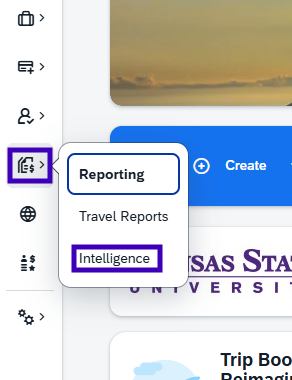
Click on the Reporting icon and select Intelligence.
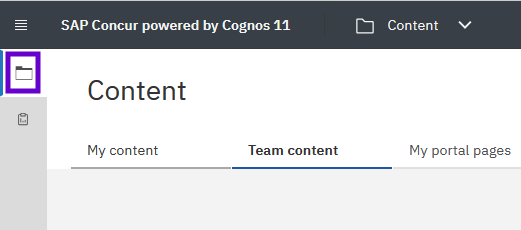
In the new browser tab, access the report library by selecting the file folder icon in the left-side menu.
Under the Team Content folder, open the Kansas State University Folder, and then the BusinessStafffolder.
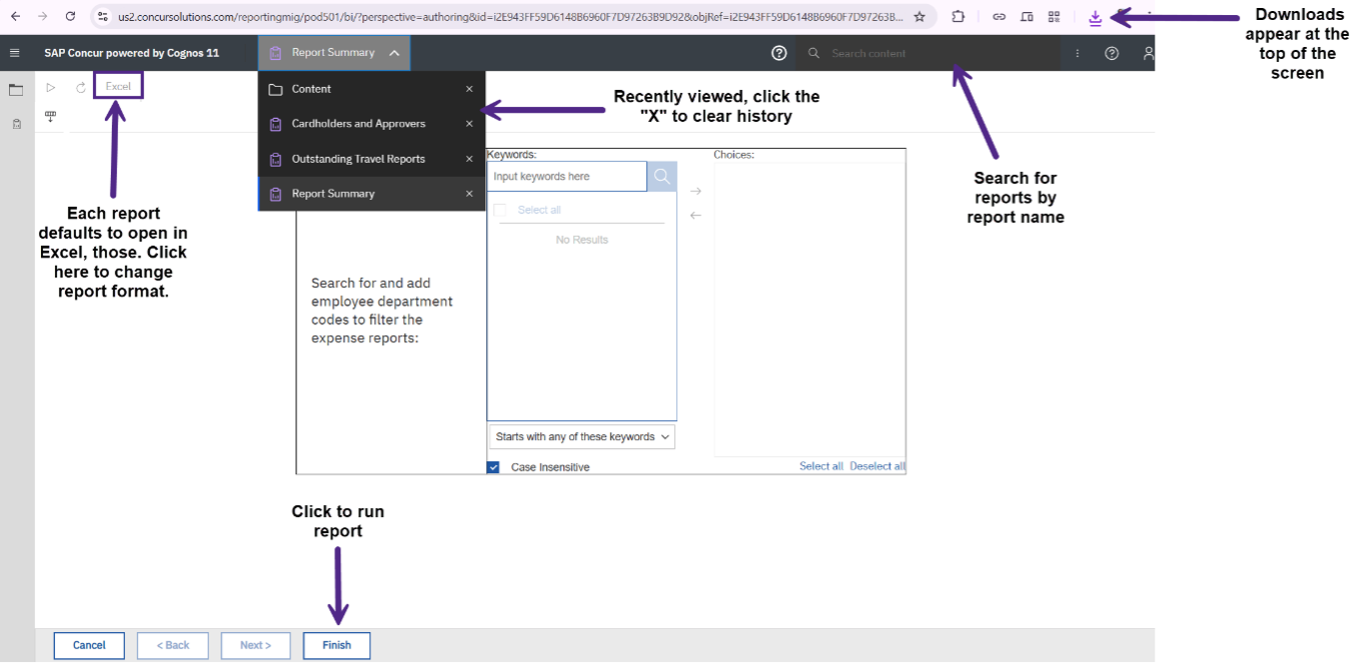
These reportscontaina significantvolumeof information. Developing the skills to navigate them effectively will help you maximize their value and gain the most relevant insights.
Glossary
Access Request – a request that can be submitted through Concur to gain access to certain permissions. Instructions for this process are shown in the user guide (pdf).
Business Liaison - Department business staff identified as the primary business reviewer in Concur. A business liaison has department level access.
Budget Fiscal Officer – An academic college's or administrative unit's financial administrator who manages the business operations, budgets, and personnel funds. They serve as the primary link between central university finance offices and unit leaders.
Entry Allocation - The specific funding used in a report.
Processor – Able to access to any submitted request/report.
Proxy – Able to act on behalf of all employees in a selected department.
Emailed reports
Report Summary, Request Summary and Unassigned Card Transaction reports are emailed every Friday, but you can access these at other times throughout the week through Concur Intelligence.Anyone who has the “Department Request/Report Process View” permission for a department is eligible to receive the emailed reports. If you wish to receive these reports, create an Access Request from your Concur profile:
Submit an Access Request with at least one “Expected Expense” of “Department Request/Report Process View.”
First, the Budget Fiscal Officer over your department and then the Department Head receive the request for approval.
If the request is completely approved by 5 p.m. Tuesday, the requester will receive the emailed reports on Friday of the same week.
Report types
The Intelligence reports are categorized into a Business Staff folder and a Budget Fiscal Officer folder. The reports that are included in each are described below. The full description can also be found in Concur Intelligence by hovering over the beginning of the description.
Business staff folder
These reports are accessible to Business Liaisons. On this page, we use Business Liaisons to refer to the department-assigned approvers in Concur. As a Business Liaison, you don't need to filter by your org numbers; the report will only run what you have access to. If you need information from other reports, such as where their funding was used outside of your department, work with your Budget Fiscal Officer.
Description: All expense reports except those that were approved by Accounts Payable longer than 14 days in the past. This report is emailed every Friday to business staff with the appropriate Concur permissions.
Important Note: Each approval status has a separate tab.
Recommended Uses: Use this report to check department employees' expense reports at all steps of approval and ensure the reports are processed in a timely fashion.
Description: Card requests approved within the last week and all Travel Requests with travel end dates in the past 30 days. This report is emailed every Friday to business staff with the appropriate Concur permissions.
Important Note: Email is easily accessible to reach out to employees for follow-up.
Recommended Uses: Use this report to ensure your department employees' travel requests are approved in a timely fashion, and that expense reports are filed within 30 days of the end of travel.
Description: All U.S. Bank purchase card transactions that have not been placed in an expense report in Concur as of yesterday at 7 PM. Filter by department. This report is emailed every Friday to business staff with the appropriate Concur permissions.
Recommended Uses: Use this report to ensure your department employees' K-State card transactions are reported in a timely fashion.
Description: All unsubmitted purchase card reports, with optional filters for department and statement month.
Recommended Uses: Use this report to ensure your employees are submitting reports in a timely manner.
Description: This report shows all unapproved Concur expense reports with travel dates ending by June 1 of the current fiscal year.
Important Note: The end date for this report is updated each Fiscal Year.
Recommended Uses: Use this report for the fiscal year-end to help ensure reports are submitted in time if they occurred before June 1.
Budget fiscal officers folder
These reports are accessible to Budget Fiscal Officers. As a BFO, you have access to view everything in Concur.
Description: See a list of a selected department's employees who have approved reports within the specified date range, along with associated counts of reports, number of expense lines, and other statistics for those employees.
Important Note: Total Number of Entries is equal to the Total Expenses. Keep in mind that this only shows the snapshot of transactions that occur in Concur, not other systems.
Recommended Uses: Use this report to view which approvers in your department need more assistance in Concur or might be taking longer than expected to help provide targeted support.
Description: This report contains 6 separate pages; three contain the average Concur workflow cycle times by College or Administrative Group, and three contain the average Concur workflow cycle times by Department.
Important Note: The time shown is the average approval time by approval step.
Recommended Uses: Use this report to see where you can provide more guidance to your business staff.
Description: Review a list of people who have department-wide access to Concur reports and/or requests.
Important Note: It is helpful to look at this report every six months to make sure that employees have the correct access.
Recommended Uses: Use this report to maintainappropriate access to business information. For example, if someone has left the university or changed positions, this allows you to see if they still need their access removed.
Description: All expense reports approved within a specified date range with Entry Allocation. Filters are available by project and department code.
Recommended Uses: Use this report to match Concur with FIS reports. This can provide insight on if the funds are coming from the correct funding source.